Tutorial: Creating a Google Analytics 4 (GA4) Property
Welcome to this step-by-step guide on creating a Google Analytics 4 (GA4) property. GA4 is the latest iteration of Google Analytics, offering a more integrated view of how users interact with your website or app. Whether transitioning from Universal Analytics (UA) or setting up analytics for the first time, this tutorial will walk you through creating a GA4 property.
Once logged in, you'll be on your account's Google Analytics dashboard. Look for the gear icon in the lower-left corner of the screen; this is the Admin button. Click on it to access your account's administrative settings.
Step 3: Create a New Property
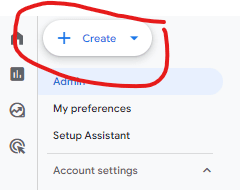
In the Admin section, you should see an oval-shaped button in the top left corner of your dashboard; it looks like the one shown below. Click the blue arrow and select "Account."
Step 4: Choose GA4
You'll be prompted to choose between creating a GA4 property or a Universal Analytics property. Select the GA4 option. If you're transitioning from UA, you might also be able to upgrade an existing UA property to GA4; however, focus on creating a new GA4 property for new setups.
Step 5: Input Your Property Details
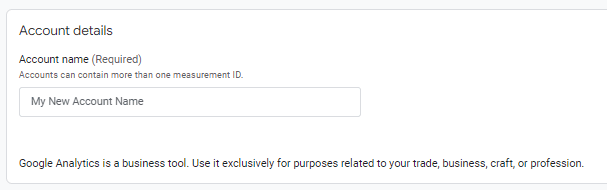
Follow the prompts to input the details of your new GA4 property. This includes:
Property Name: Choose a name that easily identifies your site or app within your GA account.
Reporting Time Zone: Select the time zone in which you want your reports to be. This is important for accurate data reporting.
Currency: Choose the currency for financial data. This will affect how revenue data is reported.
Then click the blue "Next" button at the bottom of the page. Follow several other prompts until your business profile is completed.
Step 6: Set Up Your Data Stream
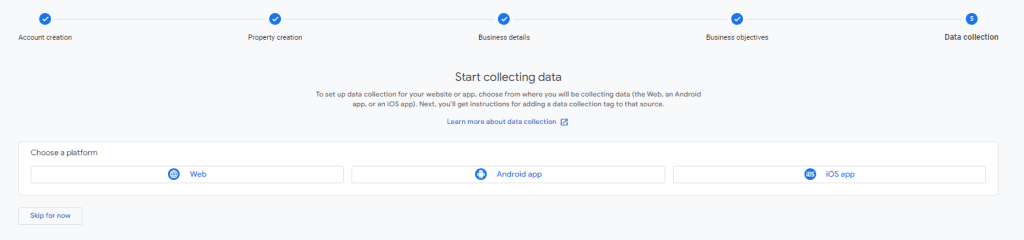
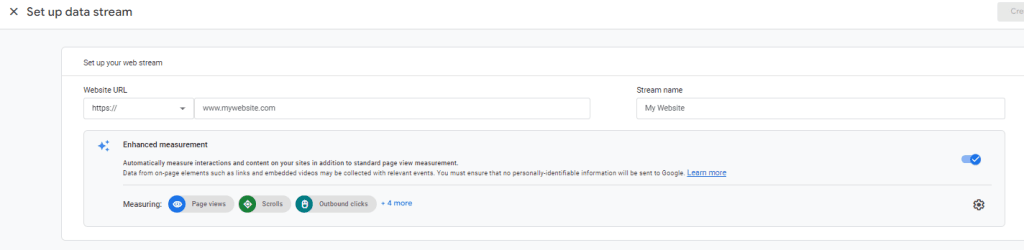
GA4 properties collect data through "data streams." You must set up at least one data stream for your website or app. Click on the Web stream if you're setting up GA4 for a website, or choose the iOS app or Android app options for mobile applications. You'll need to provide the URL for a website stream or the package name for an app stream. Follow the prompts to complete this setup.
Step 7: Add the GA4 Tag to Your Website
After setting up your data stream, you'll receive a "Measurement ID" or a "Global Site Tag (gtag.js)" code snippet. For a website, you'll need to install this code on every page you want to track. The instructions will vary depending on how your website is built (e.g., HTML files, WordPress, etc.). You can add GA4 as a new tag configuration using Google Tag Manager.
Final Step: Verify Your Setup
It's crucial to ensure that GA4 is correctly collecting data. You can verify your setup by checking the "Realtime" report in your GA4 property. If you see active users and data being reported, congratulations! You've successfully set up your GA4 property.
Conclusion
Creating a GA4 property is the first step towards leveraging Google Analytics 4's advanced analytics capabilities. Following these steps, you've laid the groundwork for deeper insights into your users' behavior and how they interact with your website or app. As you become more familiar with GA4, explore its features and settings to customize your analytics experience fully.
For Existing Users (Converting from UA to GA4)
Preparing for the Transition
If transitioning from UA to GA4, start by familiarizing yourself with the differences between the two platforms. GA4's data model and reporting capabilities are more advanced, so understanding these changes is key to a smooth transition.
Using the GA4 Setup Assistant
The GA4 Setup Assistant in your UA property's Admin section makes the transition easier. It guides you through creating a GA4 property and links it to your existing UA property, helping you retain access to historical data.
Verifying Data Collection
After setting up GA4, compare the data collected with your UA data to ensure consistency. This step verifies that GA4 correctly captures and reports your website's activities.
Understanding Date Range Comparisons in GA4
GA4's date range comparison feature is more than a mere analytical tool; it's a window into your website's performance dynamics over time. Unlike UA, GA4 allows for more granular and customizable comparisons, enabling you to draw insights from the shifts and trends in user behavior.
Benefits of Comparing Data Across Different Periods
Comparing data across different periods is invaluable. It highlights trends, helps identify what works and what doesn't, and measures the impact of your marketing efforts. Whether it's a new campaign or a website redesign, comparing data before and after these events can provide concrete evidence of their success or areas for improvement.
Step-by-Step Guide to Comparing Data in GA4
Accessing the Date Range Comparison Feature: In GA4, the date range selection is prominently displayed at the top of your reports. Clicking on it reveals options for setting your primary and comparison date ranges.
Setting Up Your Primary Date Range: Select the initial period you want to analyze. This could be the last 30 days, the previous quarter, or any custom range that suits your analysis needs.
Adding a Comparison Date Range: After setting your primary range, click the "Compare to" option and select a comparison period. You can compare it against the previous period, the same period last year, or a custom range.
Analyzing the Compared Data: GA4 presents the comparison data intuitively, with changes highlighted for easy interpretation. Use this data to understand user behavior changes, traffic patterns, and the effectiveness of your digital strategies.
Tips for Effective Data Comparison in GA4
Select Meaningful Date Ranges: For relevant comparisons, choose periods that reflect your business cycles and the timing of marketing activities.
Consider External Factors: Seasonal trends, global events, and other external factors can impact your data. Consider these when making comparisons.
Utilize Annotations: Mark significant events or changes in GA4 to help contextualize your data comparisons.
Common Challenges and How to Overcome Them
Data discrepancies and sampling limitations can challenge your analysis. Ensure your data streams are correctly set up, and consider using GA4's advanced features, like BigQuery export, to mitigate these issues.
Case Studies and Examples
Imagine a retail website that launched a major promotional campaign in March. By comparing data from March to the previous month and the same month the previous year, the marketing team could see a significant increase in traffic and conversions directly attributable to their campaign.
Comparing data across different periods in GA4 illuminates the path taken and lights the way forward. Installing GA4 or transitioning from UA and leveraging its comparison features gives you the insights to steer your digital presence toward greater success.
Further Resources
To dive deeper into GA4, explore the official Google Analytics 4 documentation and online tutorials. Various third-party tools and resources also offer valuable insights into making the most of GA4's analytics capabilities.
Through understanding and comparing data in GA4, we unlock the potential to not just react to changes but to anticipate them, ensuring our digital strategies are as dynamic and adaptable as the digital landscape itself.
If your comparisons reveal that visitors are reaching the site but not enquiring or buying, our Conversion Rate Optimization Services can help investigate what happens on the page.
A well-designed website is crucial for any business or individual looking to establish a solid online presence. However, finding the right website designer can be challenging and time-consuming. This blog post will guide you through the steps to hire a website designer without all the hassle so you can focus on creating the perfect website for your needs.
Define your project scope and goals.
Before starting your search to hire a website designer, it's essential to establish the purpose of your website. Determine whether you need an informational site, an e-commerce website, a blog, or a portfolio to showcase your work.
Identifying your target audience
Knowing your target audience will help you create a website that caters to their needs and preferences. Identifying your target audience is crucial in building a successful website or online presence. A well-defined target audience allows you to create tailored content, marketing strategies, and user experiences that resonate with your potential customers.
Analyze your product or service.
Start by examining your product or service and its features, benefits, and unique selling points. Consider the problems it solves and the needs it fulfills. Knowing your product or service well will help you determine who would benefit most from your offering.
Create customer personas
Develop detailed customer personas to represent the people interested in your product or service. Include demographic information, such as age, gender, location, income, education, and occupation. Also, consider their interests, hobbies, preferences, and online behavior.
Study your competition.
Research your competitors and their target audience. Analyze their marketing strategies, customer reviews, and social media presence. Knowing your competitors can provide valuable insights into who they are targeting and help you identify potential gaps in the market.
Conduct market research
Gather data through surveys, interviews, or focus groups to learn more about your potential customers. Ask questions about their preferences, challenges, and motivations. Market research can help you validate assumptions and better understand your target audience's needs and expectations.
Analyze your website and social media analytics.
Use analytics tools like Google Analytics or Facebook Insights to gather data about your website visitors and social media followers. Look for demographics, interests, and behavior patterns to help you identify your most engaged audience segments.
Monitor online conversations
Listen to what people say about your industry, competitors, and related topics on social media, forums, and review sites. Following conversations and issues related to your industry can help you identify common concerns, needs, and trends among your potential audience.
Revisit and refine your target audience.
As you gather more data and insights, revisit and refine your target audience. Remember that your audience may change, so staying current on their evolving needs and preferences is essential.
Identifying your target audience is critical in creating a successful online presence. Following these steps, you can understand your potential customers and tailor your content, marketing, and user experience to resonate with them. This focused approach will help you attract, engage, and convert more visitors into loyal customers.
Next, set a realistic timeline and budget for your project.
A timeline and budget will help you communicate your expectations with potential designers and ensure you stay on track throughout the process. Creating a website is an essential investment for any business or individual looking to establish a solid online presence. By setting a realistic timeline and budget for your project, you can communicate your expectations with potential designers and ensure that you stay on track throughout the process.
Define the scope of your project.
Start by outlining the specific features, functionalities, and design elements you want to include on your website. Consider the number of pages, navigation structure, multimedia elements, and any third-party integrations you may require. Knowing the project's scope will help you understand the complexity of your project and estimate the time and resources needed to complete it.
Break down the project into phases.
Divide your project into smaller, manageable phases: planning, design, development, testing, and launch. Assign a timeframe to each step based on the tasks' complexity. Breaking down your project will help you create a more detailed and accurate timeline.
Research industry benchmarks
Do some market research on average prices for website design and development to establish a reasonable budget for your project. Consider factors such as the size and complexity of your website, the expertise of your chosen designer, and the market rates for similar projects. Researching industry benchmarks will help you understand the costs and create a more accurate budget.
Be prepared for contingencies.
When setting your timeline and budget, it's essential to account for potential setbacks and unexpected costs. Add some buffer time to your project schedule to accommodate unforeseen delays or changes in scope. Likewise, allocate a contingency budget to cover any additional expenses during the project.
Communicate your expectations with potential designers.
Once you have a clear timeline and budget for your project, communicate these expectations with potential designers during the hiring process. Expressing your expectations will help them understand your requirements and provide more accurate quotes and timeframes for their services.
Monitor your project's progress.
As your project progresses, regularly review your timeline and budget to ensure you're staying on track. Adjust your plans to accommodate any scope, resources, or priorities changes if necessary. This proactive approach will help you maintain control over your project and minimize the risk of delays and cost overruns.
Setting a realistic timeline and budget for your website project is essential for a smooth and successful process. By defining your project scope, breaking it down into phases, researching industry benchmarks, and preparing for contingencies, you can create a solid plan that helps you stay on track and manage your resources effectively. Communicating your expectations with potential designers and monitoring your project's progress will ensure a successful outcome and a website that meets your needs and goals.
Research potential website designers.
Ask friends and colleagues for recommendations, as they may have previously worked with talented designers. You can also use online platforms like freelancer websites or design agency sites to find potential candidates.
Examine the portfolios and reviews of each designer to assess their skills and experience. Once you have a shortlist of potential candidates, move on to the next step.
Prepare a clear project brief.
Create a detailed project brief that outlines your website requirements, including the number of pages, design features, and any specific functionality or interactivity you need. Describe your desired website style and provide examples of websites you like. A project brief will help potential designers understand your vision and give you a more accurate quote.
Contact and interview candidates before you hire a website designer
Reach out to the designers on your shortlist and discuss your project requirements with them. Ask about their experience, expertise, and design process. Request a project quote and timeframe, and assess their communication skills and responsiveness during this process.
Compare quotes and make a decision.
Evaluate the pros and cons of each candidate, considering factors like their portfolio, experience, and price. Choose the designer who best aligns with your needs and budget.
Establish clear expectations and milestones.
Once you hire a web designer, sign a contract outlining deliverables, timelines, and payment terms. Set project milestones and review sessions to ensure you're both on the same page throughout the project. Maintaining open communication is vital to achieving a successful outcome.
Conclusion
Following these steps, you can hire a website designer without all the hassle and create the perfect website for your needs. Planning and clear communication are crucial to ensuring a smooth and successful collaboration with your chosen designer. So, take action and find the ideal professional to bring your vision to life.
Seller's Bay offers a full range of web design services to help your business succeed online. Contact us today for a free consultation.
So you have your shiny new business up and running, but now you need a website, or will your website be your new business? There are many options, and this only adds to the confusion. This article will tell you about your choices and how to get ready so your website design goes smoothly.
Getting Started with Social Media: Establishing a professional social media presence is critical. Think of social media platforms as a bustling market full of potential customers. People don't just go on social media to chat with friends; they're also looking for businesses that resonate with their needs and interests. You're opening up shop where the crowd is by setting up business pages on platforms like Facebook, Instagram, LinkedIn, and Twitter (now known as X).
Engagement is Key: Once your pages are set up, it's all about engagement. This isn't just about broadcasting your message; it's about starting conversations and building relationships. Post content that invites comments and questions. Respond promptly and thoughtfully to followers' interactions. Doing so creates a community around your brand, fostering loyalty and encouraging word-of-mouth promotion.
Content Marketing Strategy: Sharing your content on social media is a fantastic way to get more eyes on it. Each time you publish a new article, product, or service, make it a routine to share it across all your social media profiles. But don't just stop there; engage with your audience about it. Ask questions, encourage feedback, and discuss topics related to your post. This interaction can significantly increase your content's reach and impact.
Tailoring Content for Each Platform: Remember, every social media platform has its own vibe and set of unwritten rules. What works on LinkedIn might not resonate on Instagram. Take the time to understand the culture of each platform and tailor your content accordingly. For instance, Instagram is all about visuals, so high-quality photos or videos are your best bet there. Twitter/X, on the other hand, is excellent for quick, engaging updates and conversations.
Tracking and Analysis: To make the most of your social media efforts, track your results and analyze the data. Most platforms offer insights that show you what's working and what isn't. Pay attention to metrics like engagement rates, click-through rates, and follower growth. Use this information to tweak your strategy and content for better results.
Cross-Promotion with Newsletters: If you have a newsletter, that's another golden opportunity for cross-promotion. Mention your social media posts in your newsletter and vice versa. This creates a cohesive ecosystem where your audience can interact with your brand on multiple fronts, increasing their engagement and loyalty.
In essence, a robust social media presence is more than just an optional marketing strategy; it's a fundamental way to connect with your audience, understand their needs, and provide them with value. By being active, engaged, and responsive on these platforms, you're promoting your business and building a community around it.
2. Learn About Social Media Ads
Do you know how to run social media ad campaigns? Once you've made successful social media accounts, you have the opportunity to create paid ads. You do this using the platform's built-in ad maker, which allows you to target your ads to a specific audience. Depending on the social media ads platform you are working with, they will offer various methods of promoting your business via their social network. Facebook, Twitter, Pinterest, and Linkedin are all good to start with.
3. Define Your Target Audience
Identifying your target audience is crucial in crafting messages that resonate and convert. It's not just about understanding who might purchase your items but delving deep into the specifics of their demographics, behaviors, and preferences. Your target audience is the specific group of consumers most likely to be interested in your product or service and whose needs are most closely met by your offerings.
Steps to Define Your Target Audience:
Demographic Analysis: Start by gathering data on the age, gender, income level, education, and occupation of your potential customers. These factors can significantly influence purchasing decisions and help you understand who will likely buy from you. For example, you might want to target people looking for dental implants in Denver, Colorado; for this, you would want to target older people, high income, and other factors that would fine-tune your audience. This focuses all your advertising and you will get better results with any campaigns you run.
Leveraging Psychographic Insights for Tailored Marketing Strategies: Understanding the psychographics of your audience enables you to craft marketing messages that resonate deeply with their inner desires and beliefs. By analyzing these intricate details, businesses can develop highly personalized content, offers, and products that speak directly to the unique preferences and needs of their customer base. This level of customization not only enhances customer engagement but also significantly increases the likelihood of conversions, as your audience feels that your brand truly understands and caters to their lifestyles and values.
Psychographic Profiling:
Eco-Conscious Consumers: For a brand that sells sustainable products, psychographic profiling can reveal that its target audience highly values environmental conservation and ethical consumption.
Marketing strategies could include sharing behind-the-scenes insights into the sustainable sourcing of materials, spotlighting eco-friendly practices, and emphasizing the long-term environmental benefits of their products. Engaging with this audience through content that highlights sustainability challenges and solutions can foster a strong community of like-minded individuals, driving loyalty and advocacy.
Fitness Enthusiasts: A company focusing on fitness apparel and accessories might discover that their core customers are not just interested in the functionality of the products but also in achieving personal bests and being part of a fitness community. By tailoring marketing efforts to include motivational stories and fitness challenges and highlighting the role of their products in enhancing workout efficiency, the brand can appeal directly to the aspirations and attitudes of this demographic, encouraging them to engage more deeply with the brand.
Luxury Lifestyle Seekers: For luxury brands, psychographic profiling may uncover that their audience places a high value on exclusivity, prestige, and personal indulgence. Marketing messages that emphasize the craftsmanship, heritage, and exclusivity of products can resonate well with this group. Exclusive events, VIP memberships, and personalized shopping experiences can make these customers feel valued and part of an elite group, reinforcing their loyalty and willingness to advocate for the brand.
Tech-Savvy Innovators: A technology company could find that their target market prides itself on being early adopters and is always on the lookout for the latest advancements. By focusing on the innovative features of their products and offering early access or beta testing opportunities, the brand can engage this audience's desire for cutting-edge technology.
Utilizing platforms where these individuals spend their time, such as tech forums and social media groups, for product announcements and discussions can further align the brand with the interests and values of this psychographic segment. The following are a few examples:
Social Media Engagement Analysis: Tracking likes, shares, comments, and follows on platforms like Facebook, Instagram, and Twitter can reveal what content resonates with your audience. This data helps in tailoring your social media marketing efforts to match the interests and behaviors of your target customers, enhancing engagement and fostering brand loyalty.
Website Analytics: Utilizing tools like Google Analytics to monitor website traffic, page views, bounce rates, and the path users take through your site can uncover valuable insights into consumer behavior. This information allows for the optimization of website layout, content, and navigation, improving user experience and potentially increasing sales.
Email Marketing Metrics: Analyzing open rates, click-through rates, and conversion rates from email campaigns provides insights into what type of content prompts your audience to take action. This data can refine email marketing strategies, ensuring messages are timely, relevant, and personalized to the recipient's interests and needs.
Search Query Trends: Monitoring the keywords and phrases your target audience uses in search engines can guide content creation, SEO strategies, and product development. Tools like Google Trends and SEMrush can help identify rising trends, enabling businesses to align their offerings with the current demands and interests of their market.
Customer Feedback and Reviews: Gathering and analyzing feedback from customer reviews, surveys, and direct feedback channels offer direct insights into what customers like and dislike about your products or services. This information is crucial for improving product quality, customer service, and overall customer satisfaction, leading to better retention rates and word-of-mouth referrals.
Behavioral Insights: Analyze the buying behavior of your potential customers, including their purchasing habits, brand loyalties, and product usage. This will help you understand how, when, and why your target audience decides to make a purchase.
Customers leave behind a trail of digital footprints through their online activities, social media interactions, and search queries. By harnessing this data, businesses can gain invaluable insights into the customer's journey, from initial interest to final purchase. This approach enables companies to predict future buying trends, personalize marketing strategies, and create highly targeted advertising campaigns.
Understanding these digital behaviors and preferences can significantly enhance your ability to connect with your audience at the right time and on the right platform, increasing conversion rates and customer loyalty.
Geographic Location: Consider where your potential customers live and how their location affects their purchasing behavior. Urban and rural consumers can have vastly different needs and access to products and services.
Needs and Pain Points: Identify the specific needs and challenges your target audience faces that your product or service can address. Understanding their pain points allows you to position your offering as the ideal solution.
Customer Feedback and Surveys: Gather feedback from current customers to understand why they chose your product or service. Surveys and interviews can provide valuable insights into customer satisfaction and areas for improvement.
Utilizing the Information:
Once you've gathered this information, segment your audience into smaller, more focused groups. Tailor your marketing messages to each segment, addressing their specific needs, preferences, and behaviors. This targeted approach ensures that your ads are more relevant and practical, increasing the likelihood of prompting a purchase.
By thoroughly understanding your target audience, you can create more personalized, effective marketing campaigns that resonate with the people most likely to buy from you. This improves the efficiency of your marketing efforts and enhances the overall customer experience, leading to increased customer loyalty and higher conversion rates.
4. Hire a Professional Website Design Service
Did you know hiring a website design service helps you get more clients? When people access a website, they need to be able to navigate it easily. If you want them to make a purchase, clearly state what you offer and make sure they know where to go on your site to buy it. Professional website design services give you an engaging website that boosts your sales.
Diving into the world of professional website design services is a fantastic move for any business looking to expand its online presence! When you hire experts in the field, you're not just getting a pretty layout but investing in a tool that can significantly boost your client engagement and sales.
First off, let's talk about the user experience. In today's fast-paced digital world, users expect websites to be intuitive and easy to navigate. A professional designer understands this and will create a site that guides visitors effortlessly from one section to another, making their journey from landing page to checkout as smooth as silk. This is crucial because the easier it is for people to find what they're looking for, the more likely they are to make a purchase or contact you for your services.
But it's not just about functionality. Aesthetics play a massive role in how potential clients perceive your brand. A professional service will ensure your site looks modern, credible, and aligned with your brand's identity. They know how to use color, typography, and imagery to evoke emotions and convey your business's message. This creates a strong first impression, which is crucial in the digital world where visitors make snap judgments.
Moreover, these services are well-versed in SEO best practices. This means they'll design your site in a way that is friendly to search engines, helping your business climb up those search rankings and become more visible to your target audience. They'll ensure your site is responsive, meaning it'll look great and work smoothly whether it's accessed from a desktop, tablet, or smartphone. This is vital as more and more people use their mobile devices for online shopping and browsing.
Let's not forget about the technical side. Professional web designers stay updated on the latest technologies and trends. They'll use this knowledge to build a fast, secure, and reliable site. A slow-loading or frequently crashing site can drive visitors away, but a professional service will employ the right tools and techniques to avoid these issues, ensuring your site offers a top-notch user experience.
Hiring a professional website design service is more than an expense; it's an investment in your business's future. They'll work with you to create a site that looks stunning, performs well, reflects your brand, and is primed for attracting and converting more clients. So, if you're ready to take your online presence to the next level, seeking out a skilled web design team is a wise and potentially game-changing move!
5. Learn About Search Engine Optimization
SEO is like a bridge connecting potential customers to your business through the vast digital world. Imagine every search they make as a pathway, and your website is the destination you want them to reach. The smart and complex algorithms of search engines like Google, Bing, or Yahoo facilitate this journey.
Keywords are the signposts on this journey. They are the phrases and terms people enter into search engines when looking for something. When your website's content aligns with these terms, search engines take note. It's not just about stuffing your site with these words; it's about understanding what your potential customers are looking for and providing valuable content that naturally and meaningfully incorporates these keywords.
Now, let's talk about links. Think of links as votes of confidence from other websites. When a reputable site links to your page, it's like a friend vouching for you. Search engines see these links and think, "Ah, this page must be credible and valuable; let's bump it up in the rankings!" But it's not just about quantity; the quality of the links is crucial. A few links from highly respected sites can be more beneficial than many from lesser-known sources.
But SEO doesn't stop there. It also involves optimizing the structure and performance of your site. This includes making sure it loads quickly, is easy to navigate, and provides a pleasant user experience. Why does this matter? Well, search engines want to provide the best possible results to users, so they favor websites that offer a great experience.
Furthermore, SEO is an ongoing process. The digital landscape is constantly changing, with search engines regularly updating their algorithms and users evolving their search habits. To stay ahead, it's essential to keep your website updated with fresh, relevant content, continue building high-quality links, and regularly analyze the performance of your SEO strategy.
In essence, SEO is about understanding and aligning with both the technical aspects of search engines and the human aspect of your potential customers' needs and behaviors. When used correctly, it's a powerful tool that can significantly increase your online visibility and lead potential customers to your virtual doorstep. So, let's embark on this SEO journey together, optimizing your website to perform at its best in the ever-evolving digital world!
6. Use Local SEO
Local SEO is your secret weapon in the vast digital battlefield. Imagine trying to shout in a stadium full of people; it's nearly impossible to be heard. But what if you were in a small, local cafe instead? Your voice would carry much further and clearer. That's the essence of Local SEO – it helps you stand out where it matters most, in your local community.
Now, why is Local SEO so crucial? When people search for services, they often add a location to their search terms. For instance, "best Italian restaurant in Downtown Boston." If you've optimized for these local searches, your business pops up like a beacon, guiding potential customers right to your doorstep.
Here's how you can dive in:
Understand Your Community's Keywords: Start with thorough keyword research specific to your locale. Tools like Google's Keyword Planner can help you identify what your local audience is searching for. It's not just about what services you offer but how people in your area describe them. The terms used in one city might differ from another, so tailor your research accordingly.
Optimize Your Google My Business Listing: If you haven't already, claim your Google My Business listing. It's like planting your flag on Google Maps and Search, telling the world, "Here we are!" Ensure your NAP (Name, Address, Phone Number) is consistent across the web. Add photos, services, and even posts to directly engage with your local audience.
Get Local with Your Content: Customize your website's content to reflect local events, news, or cultural nuances. Blog about the local charity event you participated in or guide to local attractions near your business. This endears you to the local community and signals to search engines that you're a relevant, active part of the area.
Encourage Reviews: Positive reviews are like gold dust in Local SEO. Encourage your happy customers to leave reviews on your Google My Business profile and other relevant platforms. Respond to these reviews too, showing that you value feedback and are engaged with your customers.
Build Local Links: Connect with other local businesses and platforms to get links back to your site. This could be through local directories, partnerships, or even guest blogging on local sites. These links boost your credibility and visibility in local search results.
Mobile Optimization: Remember, a massive chunk of local searches happens on mobile devices by people on the go. Ensure your site is mobile-friendly so potential customers don't bounce off frustrated by unclickable links or slow loading times.
By focusing on these strategies, you're not just narrowing your competition pool but also making your business a prominent figure in your local community. It's about being visible to your neighbors and embedding yourself in the local narrative. So, dive into Local SEO with gusto and watch your business become a local legend!
7. Use Google Ads
Understanding Google Ads
Google Ads is an online advertising platform where you can display brief advertisements, service offerings, product listings, and video content to web users within the Google ad network. It operates on a pay-per-click (PPC) model, meaning you pay a fee every time a user clicks on your ad. This platform can be particularly effective for quickly driving targeted traffic to your website.
How to Get Started with Google Ads
Set Clear Objectives: Before diving in, define your goal. Are you looking to increase website visits, drive more sales, or get more calls? Having clear goals will guide your campaign structure.
Understand Your Audience: Who are your customers? What are they searching for? Use Google's tools to research keywords and understand the terms your potential customers are using.
Create Your Google Ads Account: Visit the Google Ads website and follow the straightforward steps to set up your account.
Crafting Your Ad Campaign:
Choose the Right Campaign Type: Google offers several campaign types, including Search, Display, Video, and Shopping. Choose the one that aligns best with your goals.
Select Keywords: These are words or phrases relevant to your product or service. When people search for these terms, your ad might appear.
Set a Budget: Decide how much you're willing to spend daily. Google Ads offers flexibility with no minimum spending commitment.
Design Compelling Ads: Write explicit, concise ads that speak to the needs of your audience. Include a strong call-to-action (CTA), encouraging users to take the next step, whether it's making a purchase, signing up for a newsletter, or calling your business.
Landing Page Optimization: Ensure the page users land on after clicking your ad is relevant, informative, and easy to navigate. A well-optimized landing page increases the chances of conversion.
Why Use Google Ads?
Immediate Exposure: Your ad can show in the top 5 results on a Google search results page, giving you immediate visibility.
Targeted Reach: You can target your ads to specific locations and times of day and use keywords to reach the right audience.
Measurable Performance: Google Ads provides detailed reports showing how many people see your ads, click on them, and take action.
Tips for Success
Monitor and Adjust: Regularly check the performance of your ads. Experiment with different keywords, ad copy, and budgets.
Focus on Quality Score: This is Google's rating of the quality and relevance of your keywords and ads. A higher score can lead to lower costs and better ad positions.
Seek Continuous Learning: Stay updated with Google's best practices and new features. Online marketing is always evolving!
In Conclusion
Using Google Ads can significantly enhance your online presence and help you reach more clients effectively. It's a tool that provides flexibility, control, and insights needed to optimize your marketing efforts. Remember, the key to success is understanding your audience, creating compelling ads, and continuously optimizing your campaigns based on performance data. Dive in, experiment, and watch your business grow!
8. Email Marketing
Email marketing keeps your clients engaged. When you get a list of your client's or potential client's emails, you can send them information on deals or business updates. This reminds them of you, builds rapport, and encourages them to buy from you.
9. Send Emails Around Holidays
If you want to improve your email campaigns, start sending targeted emails around the holiday. For instance, if it's Mother's Day, share why your products make the best Mother's Day gifts. This makes your clients more likely to make a purchase.
10. Hire Experts
If you have the resources, hire some professional marketing experts. Whether you choose to hire full-time staff or a marketing agency, these people have the expertise you need to do well. When you have a team working for you, you stand a better chance of doing well.
11. Study Your Competitors
Want to beat out your competition? If you do, you should study your competitors.
Knowing what your competition does regarding marketing and what they offer their customers will help you figure out how to stand out.
12. Conduct Tests
Unfortunately, not everything works best for every company. So, to know how to grow your client base, you need to know what works well. To do this, conduct some tests, and don't be afraid to change your approach.
13. Stay on Brand
Every single part of your digital marketing efforts should remain on-brand. Your brand consists of who you are as a company. Are you professional or casual? What tone and style do you use?
14. Maintain Media Relationships
People may not realize the power of the media when it comes to finding customers online. When you keep the media in touch with what's happening in your company, you increase the likelihood that they will write pieces on you and link back to your website. This drives traffic to your platform.
15. Use Images
Online, people don't like to read huge blocks of text. Often, they'll just scroll past this, especially if they are on social media. So, how do you get their attention? Use engaging images.
16. Make Videos
Likewise, videos engage your clients better than text. They catch their eye and give you the ability to tell the audience a story, which creates an emotional bond. People with an emotional bond to a brand are likelier to buy from it.
17. Interact
Don't just create social media profiles. Use them to interact with your clients! Hire a social media manager who can handle client requests and respond to comments. This makes you appear approachable.
18. Have Online Sales
Everyone loves a good deal. If you sell products, advertise your sales online. This causes more people to become aware of them. If you don't have any discounted products or services, you may be able to add something of value instead, such as an additional product or service accessible when they order. This is sometimes a suitable method of getting rid of any stagnant inventory.
19. Hold Virtual Events
Consider holding virtual events. This allows people to attend from wherever they have a video connection and keeps them abreast of your company's news. This can be used for brand building or promoting your business, products, and services to a target audience. It would help if you always promoted your events via all your marketing channels months before the actual event starts so anyone interested has time to schedule.
20. Get on Google My Business
Google My Business is Google's business listing service. It allows you to advertise what you do, provide links to your website, and get customer reviews. Having a Google My Business listing helps more people find you.
Want Us to Help You Promote Your Business?
Do you need help promoting your business online? Digital marketing is an important part of growing your clientele. Following the tips above, you can build a thriving online platform and grow your client base. Want help with your marketing? Let our experts help. Request a quote today to learn more!
When we talk about SEO services, we refer to a suite of activities aimed at optimizing a website to improve its visibility in search engine results. Let me peel back the layers of SEO services for you:
Keyword Research: It's about finding those golden nuggets—the keywords and phrases your target audience uses when searching for products or services like yours.
On-Page Optimization: This involves tweaking elements like meta tags, headers, and content to resonate with your chosen keywords.
Off-Page Optimization: Here, we focus on building a network of quality backlinks and leveraging social signals to enhance your site's credibility and rank.
Technical SEO: A significant aspect of SEO that deals with the site's backend features, such as XML sitemaps, robots.txt, schema markup, and more.
Content Creation and Promotion: High-quality content is king in SEO, and effective promotion is its queen. This service covers both.
Local SEO and E-commerce SEO: These are specialized SEO services tailored for businesses with a physical location or an online store, respectively.
Regular Reporting and Analysis: Transparency is vital in SEO. Regular reports keep you informed about your site's performance and the results of the optimization efforts.
When should you consider SEO services? Whenever you need a hands-on approach to improve your site's search engine visibility and don't have the in-house expertise.
Exploring the Role of SEO Consultants
Contrary to the hands-on approach of SEO services, an SEO consultant provides a more strategic view. They are the seasoned navigators who chart the course of your SEO journey. Their role involves:
1. Crafting SEO strategies aligned with your business objectives.
2. Identifying potential keywords to target.
3. Recommending changes to your site architecture to enhance its SEO.
4. Advise on content creation strategies that attract and retain your audience.
Hiring an SEO consultant is wise when you're unsure which SEO direction to take or when you need an expert to guide your in-house SEO team.
Key Differences between SEO Services and SEO Consultants
So, how do these two differ? The main distinction lies in the scope and nature of the work. An SEO consultant works strategically, providing guidance and planning your SEO course, while SEO services dive into the nitty-gritty of implementing these plans.
The Overlap Between SEO Services and SEO Consultants
There can be a gray area between these two roles. An SEO consultant may also offer SEO services, and an SEO service provider might also provide strategic consulting. In my experience, many businesses need both a strategic mind to lead the way and a diligent team to execute the plans.
In the grand scheme of SEO, understanding the differences between SEO services and SEO consultants is vital for making informed decisions. Whether you need a strategic guide, a dedicated team to implement SEO tasks, or a blend of both, understanding these roles can steer your business toward SEO success.
Now that we've demystified the concepts of SEO services and SEO consultants, it's time for you to evaluate your SEO needs. Feel free to reach out if you need a deeper understanding or personalized advice tailored to your business. After all, in the ever-evolving world of SEO, proper guidance and execution can make all the difference. Let's embark on this SEO journey together, charting a course toward greater visibility, enhanced traffic, and business growth.
There you have it. The difference between SEO services and SEO consultants need no longer be a point of confusion. With this knowledge, you can navigate the SEO waters more confidently, knowing you're making informed decisions for your business.
Remember, whether you need an SEO consultant, SEO services, or a mix of both, the goal is to improve your website's visibility on search engines and ultimately drive more traffic and conversions. After all, that's the accurate measure of SEO success.
In my 20 years of experience in this field, I've seen businesses rise to incredible heights with a well-planned and well-executed SEO strategy. So, if you're ready to start or improve your SEO journey, let's discuss how we can propel your business forward in the digital world.